Last updated 3 September 2026
Each month we release improvements, new features and bug fixes to MYOB Business. You'll also notice these changes if you use AccountRight in a web browser. If you use AccountRight desktop software, see what's new.
See what's new without leaving MYOB Business
Click the help icon and look for the What's new link at the bottom of the help panel.
What we released in August
Banking
We're continuing to improve AI-assisted bank transaction matching and reconciliation:
Get help fixing reconciliation differences
When your reconciliation is out of balance in Smart Reconciliation, select Learn about fixing a difference to open support guidance in a new tab.
See tax codes when choosing a category
Tax codes now appear next to categories in the Smart Reconciliation category list. You can also search for categories by tax code, making it easier to choose the right category and tax treatment.
Finalise reconciliations with no transactions
You can now finalise a reconciliation when the difference is $0.00, even if there are no transactions in the reconciliation period.
Understand why a transaction can’t be removed
Hover over a greyed-out tick box in the Smart Reconciliation anomaly table to see why the transaction can’t be removed and how to choose a different match.
See saved reconciliation counts
The Out of Balance banner now keeps its counts unchanged while you select or clear transactions. The counts and reconciliation table update after you select Save progress successfully.
Safer category automatching
Category automatching now avoids older, locked or out-of-period bank transactions. This helps prevent categories being applied automatically to transactions in historical or closed accounting periods.
MYOB Capture and MYOB Invoice apps retiring (Australia only)
From 29 September 2026, MYOB Capture and MYOB Invoice will stop working in Australia. MYOB Assist replaces both apps, bringing receipt capture, quoting and invoicing together in one app. If you use either app, download MYOB Assist before 29 September 2026.

More about Capture and Invoice app retirement
Surcharge changes are coming (Australia only)
From 1 October 2026, changes to surcharging will affect how you manage fees on invoices paid via online payments. We'll be updating our invoicing feature to help keep your payment experience simple, consistent and in line with the new guidelines.
This will include removing the option for businesses to pass online payment fees to your customers as a surcharge from 1 October 2026.
In the lead up to this change, we'll share more info so you'll know what to expect come 1 October.
More about the RBA surcharge changes
AI Assistant now in beta (Australia only)
AI Assistant (Beta) is a chat feature in MYOB Business that lets you ask questions about your business in plain language. AI Assistant (Beta) is currently available to a limited number of MYOB Business Lite and Pro customers.
Get read-only insights into your income, expenses, cash flow, profit and outstanding invoices, using your MYOB data.
Find answers to how-to and support questions about using MYOB Business, without leaving the chat.
The assistant remembers your chat history, so you can pick up a previous conversation where you left off.
Ask follow-up and multi-part questions in the same conversation, so you can build on what you’ve already asked.
The assistant now displays alongside your workflows and no longer covers the screen you're on. This means you can reference chat and keep working without losing sight of what you're doing.
Ask questions about your MYOB data in Claude or ChatGPT (Australia only)
The MYOB Connector is now in beta, available to a select group of Australian businesses. It lets you ask Claude or ChatGPT questions about your business finances in plain English and get read-only answers based on your live MYOB data.
MYOB Connector gives you a fast, read-only view of your numbers, from profit and loss to sales, receivables, and payables. It's the first step towards viewing your real MYOB data directly from the AI tools you already use every day.
Interested in trying it out? Join the waitlist
More guidance and control in AI BAS (Australia only)
We’ve made it easier to understand AI BAS recommendations, set up AI BAS and review GST treatment.
Clearer AI recommendations
The review page now provides more context, hints and reasoning behind suggested GST codes or amounts, including why a transaction may be considered personal or need review. After you accept a transaction, AI BAS explains that your decision helps improve future recommendations.
Guided onboarding
Learn what AI BAS is and how to use it, configure your BAS settings, and connect bank feeds, the MYOB Assist app and Smart Reconciliation.
Smarter GST detection
AI BAS now uses more context to determine GST treatment for income, rather than applying 10% to every transaction that isn’t a transfer. If it can’t confidently determine the GST treatment, it marks the transaction as unreconciled for you to review.
Dashboard (if using AI BAS)
New dashboard cards
Two new cards on your dashboard help you stay on track with your compliance tasks throughout the quarter, and they link directly to the relevant task.
AI Business Insights (Beta) expands to more customers
More customers added to the beta
AI Business Insights is now available to more MYOB Business Pro customers. It uses AI-generated summaries to highlight trends in areas such as sales, expenses, customer activity and cash flow, helping you see what may need attention.
AI Business Insights now in the Reporting menu
AI Business Insights is now accessible from the Reporting menu, making it easier to get to your insights from anywhere within MYOB Business – including reports.

More about AI Business Insights
Previous releases
To learn about changes to MYOB Business in previous releases, see MYOB Business release history.
Each month, we release improvements, new features, and bug fixes. By working online, you can also use AccountRight in a web browser – take a look at what's new in the browser.
AccountRight 2026.8.1.7 - released 22 September
This patch contains behind-the-scenes improvements to how AccountRight connects to its online services.
What's new in AccountRight version 2026.8 - released 16 September
Payroll (Australia only)
Latest tax tables for Server Edition and MSI installer
The latest tax tables (for the 2026/2027 payroll year) are now available when processing payroll in offline company files in AccountRight Server Edition or the AccountRight MSI installation.
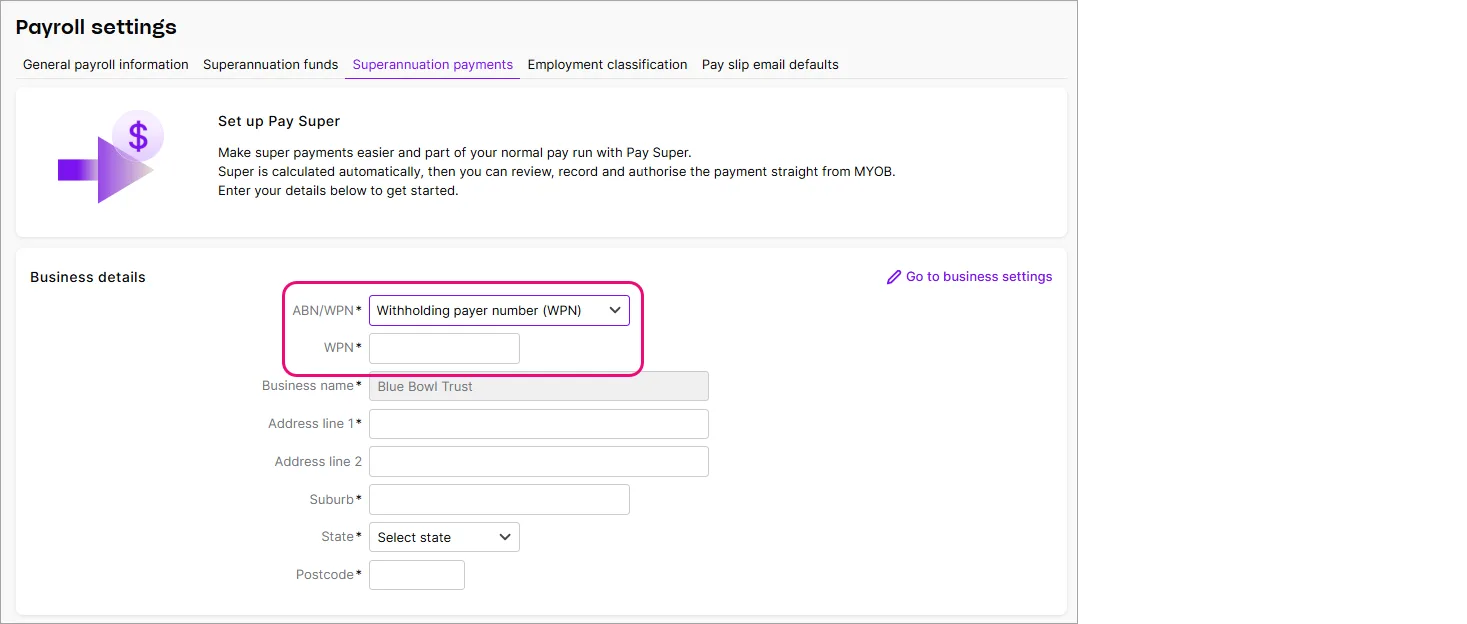
Set up Pay Super with a WPN
Businesses with a Withholding Payer Number (WPN) and no Australian Business Number (ABN) can now
set up Pay Super. This makes it easier to pay super from AccountRight and meet the ATO’s Payday Super requirements.

Online payments (Australia only)
See how online payments are working for your business (Australia only)
If you use online payments, the new Insights tab sits alongside your online payment reports. It gives you a clearer view of how your customers are paying online. Choose a date range to see your payment activity and make more informed business decisions.
Go to the Sales command centre > Online Payments, then click the Insights tab.

More about online payment reports and insights
Surcharge changes are coming (Australia only)
Get ready for surcharge changes:
From 1 October 2026, you’ll no longer be able to pass online payment fees on to customers as a surcharge. We’ll remove the surcharge option from new and existing invoices. Your customers can continue to pay invoices online, but the payment processing fee will continue to apply and will be deducted from the amount you receive.
New reminders about surcharge changes
New banners in invoicing screens, like the sales register and within invoices, remind you that surcharging changes take effect from 1 October 2026.

More about the RBA surcharge changes
MYOB Capture and MYOB Invoice apps retiring (Australia only)
From 29 September 2026, MYOB Capture and MYOB Invoice will stop working in Australia. MYOB Assist replaces both apps, bringing receipt capture, quoting and invoicing together in one app. If you use either app, download MYOB Assist before 29 September 2026.
More about Capture and Invoice app retirement
Easier AccountRight upgrades
When an older version of AccountRight is decommissioned, we’ll upgrade your company file for you. You’ll only need to update the AccountRight app when prompted – there’s no need to manually upgrade your company file or manage a file-version change. Once the app is updated, you can continue working as usual.
What you need to do – When prompted, click Restart AccountRight or Update now to install the latest version of the AccountRight app.
API developers
Faster purchase bill retrieval in the public API
We’ve improved the performance of the purchase bill endpoints when retrieving bills with many lines. This helps third-party apps retrieve large numbers of bills more reliably.
Bug fixes
(Australia only) When a working holiday maker enters their country of origin during self-onboarding, it’s now saved to their employee card. This helps payroll apply the correct tax rates and rules.
Previous releases
To learn about changes to AccountRight in previous releases, see MYOB Business release history.
* All dates are indicative only and subject to change.