Connect AI tools like Claude and ChatGPT to help you explore your business finances. This is possible through a standard called MCP (Model Context Protocol), which allows AI tools to securely connect to MYOB Business to retrieve your business data.
Once connected, you can ask questions in Claude or ChatGPT about your business finances in plain English and get answers based on your live MYOB data.
The connection with MYOB is read-only, which means once you're connected, Claude or ChatGPT can retrieve information from MYOB Business, but it can’t make changes to your data.
What are AI tools?
AI tools use artificial intelligence to understand questions and generate responses. Tools like Claude and ChatGPT can respond to questions in plain English. When connected to MYOB, a supported AI tool can use relevant information from your MYOB business to answer questions about your finances.
AI-generated answers can be incomplete or incorrect. Check important information against MYOB before making business or financial decisions.
Why connect AI tools to MYOB?
An AI tool can help you get a quick view of information in your business without searching through reports yourself. For example, you could ask about revenue, expenses, overdue invoices or cash position.
The connection uses information from your MYOB business to answer your question. It doesn't replace MYOB, professional financial advice or your own checks.
What you need to connect
To connect an AI tool to MYOB, you'll need:
an active MYOB Business Pro, Lite or AccountRight subscription
your own subscription to the AI tool you want to connect, like Claude or ChatGPT
your MYOB login details to authorise the connection
approval for the AI tool to access the business in My Account. The business owner needs to give this approval.
Allow AI access in My Account
The business owner controls whether supported AI tools can access each MYOB business. This gives the owner a way to decide which AI tools are permitted before a user connects.
When the owner allows access for an AI tool in My Account, the business becomes available to connect from within that tool. This permission doesn't connect the AI tool by itself. A user who has access to the MYOB business must still sign in to the AI tool and authorise the connection there.
Allow access only for AI tools you choose to use. If you manage more than one MYOB business, check that you're allowing access for the right business. The owner can review the available AI connections in My Account.
To allow access to MYOB Business
Sign into My Account.
If you have multiple MYOB businesses, choose the one you want to allow AI access to.
From the quick links on the right, click Manage AI connections.
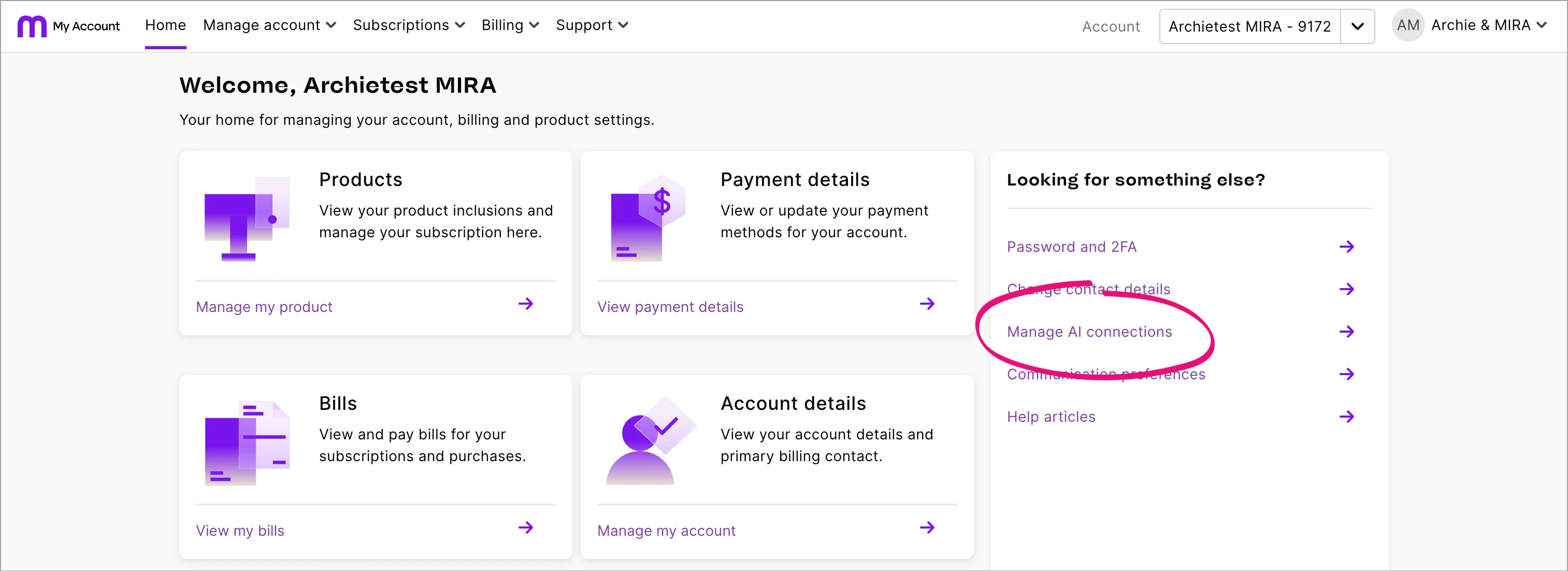
Click AI file access.
Find the business you want to connect.
Choose to allow access the required AI tools.



Allowing access makes the business available to select when you connect from Claude or ChatGPT, but it doesn't complete the connection. You still need to connect to MYOB from within Claude or ChatGPT.
Privacy, data security and memory
Connecting an AI tool to MYOB is optional. You must sign in with your MYOB login and authorise the connection. MYOB handles your sign-in, so the AI tool doesn't see or store your MYOB password.
The connection is encrypted and read-only. The AI tool can retrieve information that your MYOB permissions allow it to access, and sends the information needed to respond to your question. It can't make changes to your MYOB data.
Your conversation is also subject to the AI provider's terms, privacy settings and data controls. Depending on your settings and account, the provider may use conversations to improve its AI models. Review the provider's privacy and data settings before using the product with business information.
AI tools may also use information saved in their memory or chat history. That information is managed by the AI provider, is separate from your live MYOB data and may not be current. Review the provider's memory and chat controls if you want to manage information it has retained.
Connecting an AI tool
You can currently connect to MYOB from Claude or ChatGPT. For instructions, see Connecting Claude to MYOB and Connecting ChatGPT to MYOB.